The PhoneGnome blog has a post today showing how to use the little $99 PhoneGnome box to give our landline a shot in the arm and bring than old landline into the 21st century.
Step 1: keep your basic landline costs under control
If you're stuck with a landline, because it's required with your DSL service, or because you want landline 911, or any other reason, there's no use paying more than you need to for it. Services like 3-way calling, call forwarding, etc. are expensive from the phone company, even if purchased in a bundle. In order to get the cost of a landline down, you need to remove all those features - basic landline service can be as low as $3 to $5 per month (approx $10 per month with all the fees/taxes). But you lose the features - by connecting up a PhoneGnome box to that basic line, you get most of the call features back - free - without monthly fees.
And beyond those basic calling features, you get a whole slew of new features the phone company doesn't offer at any price, starting with voicemail to email - also free.
Step 2: Cheap long-distance calls
With PhoneGnome connected, you can keep using the landline for inbound and outbound local calls, while avoiding using it for more expensive toll and international calls. Activate a VoIP plan and all your toll calls will use the Internet at greatly reduced costs (sometimes even free).
Step 3: Mobile and more
If you're the kind of person that likes to keep things simple, there's not much you need to do to use PhoneGnome as shown above to save money and continue to enjoy features. On the other hand, if you like to take things to the limit, PhoneGnome lets you do that too, working with your mobile phone, PC, web sites, and VoIP services.
Probably one of niftiest "advanced features" is PhoneGnome's mobile integration capabilities. You can have your cell phone(s) ring with your home phone when someone calls your home number. You can check your voicemail from your cell phone with "Visual Voicemail". You can sling your home phone service to your mobile phone - to name just a few.
Summary
In short, just because you've decided to keep a landline, doesn't mean you have to pay a fortune for it or that you need to be stuck in the dark ages in terms of features. Just connect a PhoneGnome box to that old landline and enjoy VoIP features and cost savings along with landline reliability.
Friday, May 23, 2008
Boost your landline with VoIP


Thursday, May 1, 2008
PhoneGnome adds SMS beta
PhoneGnome added the ability to send SMS from your My PhoneGnome account. The rates look better than Skype's to most destinations.
Next, they need to add an API call for doing this to their (rather comprehensive) collection of free APIs.
Check out the company blog for details: PhoneGnome adds SMS sending

Friday, April 25, 2008
PhoneGnome is Slingbox for your phone line
The PhoneGnome box is very much like the Slingbox. Slingbox plugs into your cable TV (or some TV source) and connects it to the Internet, as shown below: Slingbox makes your home TV service available to you on your PC or mobile phone over the Internet.
The PhoneGnome box does almost the exact same thing for your home telephone service. Let's change the above diagram to a PhoneGnome setup:
Just as Slinbgbox "slings" your TV, PhoneGnome "slings" your phone wherever you want. As with Slingbox, even though it doesn't show it in the above diagrams, both products can also "sling" to your mobile phone.
With Slingbox, your "TV Source" can be cable, antenna, a TiVo etc. With PhoneGnome, your "Phone Source" can be an ordinary landline (wall jack) or the output of a cable phone box, a Vonage box, or any ATA-based phone service. This means you can add a softphone to your Cable "digital phone" service using PhoneGnome. This makes it possible to use that unlimited calling plan anytime, anywhere. You can even use the ooma hub as your "Phone Source", making it possible to make free domestic calls anytime from your PC or mobile phone, or use your ooma service at work, or at Starbucks, etc.
Friday, February 8, 2008
So what can PhoneGnome do for me?
The PhoneGnome service allows you to make and receive calls from your PC or regular phone. PhoneGnome accounts can be setup using any phone number - setting up an account is free. Calls between registered PhoneGnome numbers in the US/Canada (mobile or landline) are free, as are calls to registered landline numbers in designated "free countries"; calls to other numbers and SMSs to phones are very cheap. Phone numbers in many countries can be purchased at extra cost (~$3 per month for US numbers).
What do I need to use "PhoneGnome"?
- A mobile or landline telephone number
- A web browser to setup the account and initiate calls
Optional:
- A computer with headphones/speakers
- A SIP ATA
OK, let's get started...
Step 1: Create Account Visit my.phonegnome.com and enter your name, telephone number, email etc. to create a new account.
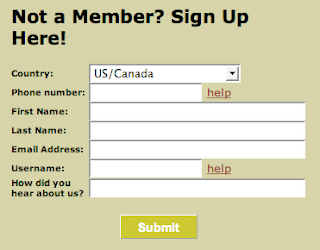
During the signup process, the PhoneGnome system will send you an email with a PIN code and a link to verify your number. When you click the link, PhoneGnome will call the phone number you entered (the phone number of your PhoneGnome account) and prompt for the PIN. Enter the PIN number and your account will be created.
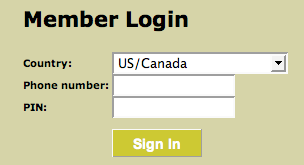
Step 2: Sign In
Visit my.phonegnome.com again and this time sign in using the telephone number you provided and the PIN that PhoneGnome assigned you.
Step 3: Test PhoneGnome
After you have signed in, type **3 into the "Quick Call" box and click the CALL button.
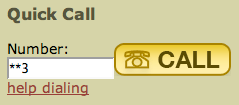
Your phone will ring and when you answer, PhoneGnome will say your telephone number.
NOTE: DO NOT test by calling your own number! This doesn't work because PhoneGnome first calls that number to initiate the call and so your phone will be busy when PhoneGnome tries to place the outbound call to that same number.
Step 4: Make calls to people who have also registered with PhoneGnome
This is where we see what separates PhoneGnome from services like Skype. With Skype, you would need to know the person's Skype-name and only if the other person is at their computer, would they hear Skype ringing. With PhoneGnome, you enter their real phone number the same way you dial it on your regular phone, and press the CALL button.
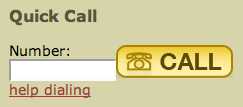
First your phone will ring and when you pick up, the other person's real phone will ring - even if their computer is not turned on. When they answer, you simply talk normally. They will not even know it was a PhoneGnome call.
Step 5: Make calls to people who can't (or won't) register with PhoneGnome
PhoneGnome can call any phone world-wide (including mobile/cell/hand-phones). It works the same as calling other PhoneGnome members - you just dial the phone number. You can purchase some calling credit, called voovox credits, (starting with $5). The call cost is typically about $0.02 per minute.
Your computer does not need to be on to receive calls
Unlike many other services, PhoneGnome members can call you free even when you are not at your computer. You do not need to leave your computer on or setup call forwarding when you are not signed in to PhoneGnome.
Additional PhoneGnome Features:
Adding Contacts
Click PhoneBook to manage your PhoneGnome contacts. Click [Add Contact] to add a new contact.
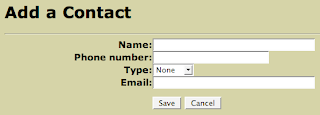
Enter the contact details and click Save.
Use PhoneGnome to record calls:
Simply put **732 before the number you're calling, and PhoneGnome will record the call. The recording will appear on your My PhoneGnome site under Call Analysis / Recorded Calls where it can be downloaded to your PC and used in other applications or played directly in the browser.
Calling users on other VOIP services
In addition to dialing regular phone numbers, PhoneGnome can also be used to call SIP Addresses, Skype (and SkypeOut calls), as well as calling users on other VOIP services and popular IM systems such as GoogleTalk, MSN, and Yahoo! For more detials, click the help dialing link next to the Quick Call button.
Note: Skype calling requires the PhoneGnome box and free GnomeLink for Skype feature activated.
Calling directly on the PC:
If your number is outside the "free regions" and therefore not eligible for free phone to phone calling, you can still use the PhoneGnome service to make free calls to other PhoneGnome members' real phones in the US/Canada and other qualifying numbers by using your PC. First you activate the feature called SoftGnome Remote Access on the My PhoneGnome 'features' page. Click Features / SoftGnome Remote Access / Activate and on that page download the free PC software provided by PhoneGnome (link here). Beware: The user name and password are not the same as what you use to sign in to your My PhoneGnome account. To get the username and password, go to Features / SoftGnome Remote Access / Edit / View SIP Credentials. If you don't have a PC, you can use any SIP softphone with the PhoneGnome "SoftGnome" SIP credentials. You can even setup an ATA box or Asterisk server to use your PhoneGnome account. PhomeGnome won't provide tech. support for that, but you can get help on the forums.
More cool features and sites:
We've only scratched the surface here. There's still Voicemail, downloadable Call Logs, Missed Call Notification, Find Me/Follow Me, PhoneGnome Mobile, PhoneGnome for iPhone, Voice Messaging, Dial-thru, and dozens of other features of PhoneGnome.
Monday, February 4, 2008
PhoneGnome on iPhone
PhoneGnome released what appears to be a customized version of their MobileWeb feature for the iPhone. I don't have an iPhone so I can't speak first hand about it, but according to the blog post:
- Use your iPhone to make calls on your home-phone or office-phone service through your PhoneGnome account
- Make International calls at cheap PhoneGnome rates - or even free!
- Check your PhoneGnome voicemail directly on your iPhone
- Have all your PhoneGnome Contacts conveniently and automatically on your iPhone
- Place calls to VOIP and IM users without hacking your iPhone
The interface looks pretty slick. Maybe when my contract runs out, I'll get an iPhone. In the mean time, I'm using PhoneGnome MobileWeb on my basic Verizon cell phone just fine.
Being able to check voicemails by clicking a link that goes right to the specific voicemail and plays it, without navigating an IVR menu, is simply addicting. That's certainly the coolest feature of PhoneGnome MobileWeb for me - and I don't need an iPhone to use it.
Friday, December 14, 2007
PhoneGnome Call Recording - very slick
I've searched all over the Internet and I have not found anything out there that matches PhoneGnome's phone call recording features.
There are software programs for a PC (using a modem) but this requires a PC to be left on. There are hardware gadgets that you connect to the phone line or the handset of your phone that can record to a tape machine. But none of these come close to the simplicity nor the capability of PhoneGnome. You can literally spend thousands of dollars on conversation recording equipment and still not have what PhoneGnome provides.
PhoneGnome provides both "selective recording" and "automatic" or "full-time" recording.
Selective Recording
Selective recording means you want to record a specific call. To do so, just dial **732 (**REC) before the call. At the end of the call, you can find the recording on your My PhoneGnome site (as shown above).
Automatic Recording
With "Automatic" or "Full-time" recording, PhoneGnome will automatically record conversations. You can record all outbound calls, all inbound calls, or both. When someone calls you, recording will be triggered automatically and the calls will be archived on your My PhoneGnome site by date and number.
To activate automatic recording dial the following codes:
| Code | Recording Mode |
| **7321 | Activate automatic recording of outgoing (placed) calls |
| **7322 | Activate automatic recording of incoming (received) calls |
| **7323 | Activate automatic recording of both outgoing and incoming calls |
| **7320 | Disable automatic recording |
Downloading
Recordings are stored on your My PhoneGnome website as WAV files. These can easily be downloaded to a PC and saved forever, copied to CDROM etc. The PhoneGnome website only holds recordings for so many days (about a week it appears), so if you want to keep a recording longer than that, you must download it to your PC and store it off-line. There are utilities to convert the WAV file to other formats such as MP3. You can also do this conversion with iTunes (From the Advanced menu, choose Convert.)
Once you have the audio file on your PC, you can do anything you want with the recording using your favorite audio editing and mixing software - even lie detector analysis! :)

Disclaimer
The My PhoneGnome site has information about the legality of recording phone calls. There are other sites with information, such as: rcfp.org but I am explicitly NOT providing legal advice. The laws apparently vary by state so check with your legal advisers regarding the implications of recording phone calls.
Thursday, December 13, 2007
Will a Softphone work with my Cable VOIP service?
Here's a question I was recently asked:
I just got my cable company's digital (VOIP) phone service. Since I already had their Digital TV and Internet service, I got a really good deal on this.Answer: YES!
They basically just switched out my old cable modem for a newer one that supports this service. So I'm curious if there's any way I could make and receive calls on my Mac using my new phone service? So I was thinking perhaps there's a softphone or some kind of application that would allow me to do this? I've looked around and seen some applications like X-Lite and iSoftphone but I'm not sure if these will do the trick. I'm actually not sure if anything will.
It seems rather complicated. This isn't something I really need, because I can obviously just use a regular phone, but it would be kind of nice.
Purchase the PhoneGnome box ($99) and connect it to your cable modem phone output (connect PhoneGnome between the cable box and your phones). Then you can use X-Lite or iSoftphone on your Mac using the SIP softphone credentials provided by PhoneGnome.
This way, you can even use your cable digital phone service when away from home - at work, from a hotel, at a friends house, Starbucks, etc. - anywhere you can get an Internet connection (even from another country). There are no extra monthly fees for this service - your cable company won't even know (and PhoneGnome doesn't charge monthly fees for the softphone capability).
By the way, this approach works with ANY hardware based VoIP service, even if they don't offer a softphone or support SIP, including even ooma.
Tuesday, December 4, 2007
Cheap International calls on cell phones

The new MobileWeb that we talked about recently has another feature that we didn't say much about.
It's a terrific way to make cheap International calls on your cell phone. Simply click 'Call' to dial any number, or click 'Contacts' to make a call to one of your My PhoneGnome contacts - which includes SIP, Gtalk, Yahoo! Messenger, or even Skype contacts. That means it's possible to call someone on Gtalk, SIP, or these other systems directly from your mobile phone, even without a special high-speed data plan or VoIP software download.
As an example, call someone in France for 2.3 cents per minute using PhoneGnome Mobile Web with no special plan and no monthly fee - as opposed to the standard AT&T rate of $1.49 per minute! If the person is a PhoneGnome member, the call is free - Even better!
Wednesday, October 31, 2007
PhoneGnome introduces new Mobile Web with Visual Voicemail
PhoneGnome today announced a new Mobile Phone version of their VoIP service. The new "Mobile Web" service lets us use our PhoneGnome accounts directly on our mobile phone web browser. Key features are:
(1) It doesn't require any downloads or installation of software. (2) You don't need high-speed data plan. (3) Visual Voicemail for (almost) any phone. (4) It's free.
They appear to have worked pretty hard to ensure the service works on more mobile phones than many other mobile phone apps that usually require a high-end smartphone, such as a Blackberry or Treo. I tried the service on an old Motorola V60 (monochrome 96 x 64 screen) which only supports WAP/WML 1.0 and it worked fine (despite the phone's clunky limitations). It looks great on Samsung T639.
Visual Voicemail
The PhoneGnome Mobile Web service provides access to your PhoneGnome Premium Voicemail directly on your phone. You can bookmark the voicemail page to get to it faster (maybe as few as 2 clicks, depending on the phone and how easy it is to call up bookmarks).
If you only have one voicemail, it's probably faster to call in and retrieve it the old-fashioned way. But if you have a number of pending messages, that's when the Visual Voicemail aspect really shines. You can see the list of messages, with caller details, time/date etc. and click to listen to just a specific message. Pretty slick.
PhoneGnome says the service works with any cell phone. It requires at least a basic Internet web browser and associated web surfing plan ($5.99/mo T-zones, for instance). Most phones sold in the last few years have at least a basic browser capability that would probably work with this service and more and more basic phone plans are including at least limited web access (since they sold you a phone that supports it, many people sign up for a plan that includes browsing).


Tuesday, September 25, 2007
PhoneGnome "Better Experience Factor": Part 2
Even the non-aficionado may dimly recall hearing about "advanced features" starting as far back as the early ‘90s — automated voice-based personal assistants, one-number service, “find me-follow me”, text-to-speech email, etc. Pick one for, say, $15-20 per month.
These services failed for what I call the Three-C's - they were Cumbersome, Complex, and too Costly.
VoIP services like PhoneGnome strive to overcome these problems, trying to find the right balance of useful capabilities without being too complex, while at the same time, keeping the price low enough for consumers. It is not easy. Consumers are tough to please, when it comes to telephony services. They want a lot for little money - and it better be easy to use. And they are quick to drop a service at the first hiccup or if it is too hard to use. Who knows if, in the long run, PhoneGnome, or anyone, will succeed in hitting this sweet spot on a grand scale. In my case, they do.
Internet Answering Machine
For $100, PhoneGnome gives me an answering machine that can (1) answer the phone, (2) play a greeting to a caller, (3) take a message, and (4) package it into an email and send it to me. That may not sound like that much. Is it worth $100? Maybe not to some. It is to me.
Here is what you get in your inbox if you sign up for the Premium Voicemail Service from PhoneGnome. I imagine the standard Voicemail email looks similar:
From: PhoneGnome [voicemail@televolution.net]
Sent: Sunday, September 23, 2007 6:25 PM
To: Joe Smith
Subject: New message 1 in mailbox 2075551212
Attachments: msg0000.wav
Joe Smith:
"SMITH SUE" <2075551212> left a 0:20 long message in your PhoneGnome mailbox at Thursday, March 23, 2006 at 06:27:06 PM.
Check your PhoneGnome Voicemail by dialing **123 on your PhoneGnome phone.
Standard PhoneGnome free voicemail will send a .WAV file attachment to any email address. Callers will only hear a default greeting if you use the free standard voice mail. If you sign up for the Premium voice mail service for $19.99 (gives you one full year) you can record your own greeting and also get sent both an email with .WAV file of the a caller's voice message (this is the same as the free voicemail service) and get an SMS/text email sent to another email address.
PhoneGnome voicemail means I can pick up my voicemails anywhere I can get my email, which is just about anywhere these days. It also means I have the recorded message as a .WAV file that I can send to someone else, or use on my PC, save it forever, etc.
What's nice about this is it's super simple. All I have to do is click 'Activate' to enable the feature. I can change the email address(es) and set the number of seconds before PhoneGnome picks up and that's all there is to it. Simple, but very useful. And something the telephone company won't give me.
When I get an SMS from PhoneGnome premium voicemail, I know who left me a voicemail, so I know whether I need to check it right away, and when it can wait. This is about convenience, improving the "experience", making my phone behave the way I want it to behave, and work with what I want it to work with.
Next up, getting these same features on your cell phone, using PhoneGnome voicemail on your cell phone.
Friday, September 21, 2007
PhoneGnome "Better Experience Factor": Part 1
I mentioned before, two scenarios for using PhoneGnome:
- Free calls to PhoneGnome buddies (like Skype free calling)
- Cheap calls to non-members (like SkypeOut)
The difference with PhoneGnome is that these Skype-like capabilities work with any standard phone using regular phone numbers instead of using a PC and nicknames.
The majority of PhoneGnome users probably became interested in the service based on one of these cost-saving related benefits - the "Cheap or free factor". But there is another benefit and it's the third PhoneGnome usage scenario: Better Experience
Generally we only think of VoIP in terms of how we can use it to make calls, for outbound calling. In this case, with the "Better Experience" factor, we're now talking about more than that. In particular, benefits that have nothing to do with making calls at all, cheap, free or otherwise. Nobody thinks of VoIP in this way today because all we've heard about are cheap calls, so we're trained to think about it that way.
But once you have a product like PhoneGnome, you realize the most significant and life changing benefits of VoIP may be elsewhere, and the cost savings become just another perk, icing on the "experience" cake.
This series of posts will expand on this "Experience Factor" and try to put into practical terms.
Thursday, September 20, 2007
PhoneGnome Cheap and Free Calling
Free Calls
If you are familiar with Skype, then you understand PhoneGnome free calling. Skype says: "It’s free to download and free to call other people on Skype." In this case, "free" means you don't pay Skype, or anybody else, to make calls. It's the same concept with PhoneGnome. It's free to call other people on PhoneGnome, as in, you don't pay. This is in contrast to Vonage "free" calls, mobile phone "free long distance", and so on, which one pays for every month on their phone bill.
The difference with PhoneGnome is that everything is done with real phone numbers. To call someone on Skype free, we call their Skype "handle" (or nickname). With many other VoIP services, we dial a special number to place a free VoIP call. With PhoneGnome, we call the person by dialing their real phone number and the call is automatically free if that person is a PhoneGnome user (whether that person has the "PhoneGnome box" hardware or not).
There are some special codes and ways to dial "handles" and nicknames that apply when we are using PhoneGnome to call people on some other systems, or to place a call to a SIP address, but this is only needed because of the situation of that other person and the VoIP or IM system they are on, not because of PhoneGnome. In other words, in cases where the other system does not give users real phone numbers, we may have to use a handle or special "**" dialcode prefix or similar, but that isn't PhoneGnome's fault -in fact, PhoneGnome is one of the few VoIP services that provides any means to call such services free.
Paid Calls
That covers free calls - we dial the person's regular phone number, and if they are on PhoneGnome too, the call is free. What if they are not on PhoneGnome? Here is the way it works.
- Always Local: The call is 911, a local call, a 1-800 number etc. - it goes out via the locally attached landline
- Domestic Long Distance or International: If we activated a VoIP calling plan through our My PhoneGnome setup, the call is placed using the VoIP service. If not, the call is simply placed as usual, via the locally attached phone line.
Remember, this "calling plan" issue only applies if the call cannot be sent free. PhoneGnome always first checks to see if a number is a free call (applies to international calls too), in which case any optional calling plan is irrelevant.
Let's pause and take a look at a few scenarios or applications for the PhoneGnome box, given the above:
- I just want to make free calls to PhoneGnome buddies (imagine Skype without SkypeOut).
- I'm more interested in saving money on calls to non-PhoneGnome members.
For Scenario #1 I don't need any plan for non-PhoneGnome numbers. I can get Skype-like free calling to my buddies that I get to join PhoneGnome by simply dialing their phone number on my regular phone, the same way I called them before PhoneGnome. The rest of my calls happen the same way as before, whether local, 911 or whatever. There are no monthly or other fees. My friends and I call each other free, without turning on our computers or picking up a separate VoIP phone - without even dialing in any new way. I do the same things I did before with my phone, but now my calls to those that are on PhoneGnome too are automatically free (they don't need to buy the PhoneGnome box to register their number with PhoneGnome - it's free).
For Scenario #2 I want to select a calling plan that matches my requirements. Specifically, with VoIP plans, one is generally balancing price vs. quality and reliability. When looking at price, you need to consider where you call most, or perhaps more importantly, where you're spending the most money. Different VoIP providers and plans tend to always have some good prices to certain places and some not so good prices to other places. There really is no plan with the best prices across the board.
The most convenient option here is to select one of the PhoneGnome plans. To maximize the savings, one should also eliminate or reduce the long distance plan on their standard phone line. There are long-distance services that have no fixed monthly fee. Often you have to opt for on-line or paperless billing. It's worth it, since with PhoneGnome and a VoIP calling plan, you won't be sending calls to your Verizon (or AT&T or whatever) phone line anymore, it makes no sense to pay a monthly fee for a long distance plan on that line. Some people drop all long-distance plans (in which case long-distance calls cannot be made using that line). I don't recommend this. I suggest getting one of the no monthly fee plans instead, so you at least have the option to make a call in a pinch using the landline, if you had to. It doesn't cost any more to do so if you get a service with no fixed monthly fee. Given how cheap VoIP services are, the amount you save by eliminating a fixed fee on your landline alone might cover the costs for all your calls made using a PhoneGnome VoIP service.
The "default" PhoneGnome option is a service called "voovox" which is a per minute service (like SkypeOut). In general, the rates are reasonable and the service works fine. You can see your voovox balance right on your My PhoneGnome site and you can top up right from the My PhoneGnome site (which takes you to the PhoneGnome shopping cart). This is by far the easiest option for cheap calls with PhoneGnome, without complexity. You simply buy credit and PhoneGnome automatically completes the setup for you. It's a great way to test the VoIP waters too, because you can buy $10 worth of credit and try it out without a contract or long-term commitment.
If you make a lot of calls, PhoneGnome also offers a couple of flat rate "unlimited calling" plans. They offer a $14.95/mo plan for unlimited calls to US/Canada and a "Platinum" plan for $21.95/mo that includes calls to Europe, parts of Asia, and common international countries. They also have a plan called "Reach Beyond" that works like MyFavs, except it works for numbers outside the US too - about 15-20 countries, (typically landlines-only outside the US/Canada).
A unique feature of PhoneGnome is that you can select a different plan for your International calls versus your Domestic (long-distance) calls. For example, you could use your landline service for Domestic calls (maybe you like the bundle you already have) and voovox just for international calls.
Hacking PhoneGnome
A very unusual thing about PhoneGnome is that they let us use third-party VoIP services almost as easily as the PhoneGnome plans. Once such a service is configured, it works just like the PhoneGnome plans. You just dial, and calls are sent using the service automatically. This is still geek territory in terms of setup though. Selecting and activating a PhoneGnome plan like voovox above is essentially automated, where all the dark secrets go on in the background, behind the scenes. Not so, if you want to setup a third-party provider. You have to be comfortable with SIP usernames, proxy hostnames, and so on. If you have configured a SIP softphone, it's roughly the same thing (although somewhat fewer settings to figure out).
Here's how to get to the option for using a third-party provider:
Features / Low Cost Internet Calling / Edit / [Add Internet Calling Service] / Manual SIP Settings
PhoneGnome provides a site where users can share their experience with third-party providers. There is a link to this on the Manual SIP Settings page where you can see if other PhoneGnome users have anything to say about the service you want to try. People have used the following services with PhoneGnome: Junction Networks, voipcheap, SIP Discount, VOIPBuster, Sipgate.co.uk, Gizmo Project, wengo, VOIPdiscount, Diamondcard.us, Onesuite.com, Inphonex, Voxee.com, FonoSIP, Terracall, VoicePulse, CALLcentric.com, and others, which speaks to the flexibility and compatibility of the PhoneGnome system. Clearly, some services work better than others. You can view the reviews (site here) but you need to be logged in to your My PhoneGnome account to provide feedback about a service.
The other thing to keep in mind, if you want to take the third-party VoIP provider route, is that PhoneGnome doesn't provide support for these DIY services (only for the ones they provide). Their site says:
Note: The capability to select a SIP ITSP service is provided as a convenience to our customers. Your use of this capability is at your discretion. You assume all risk associated with doing so. These services are offered by third-parties and may be subject to terms of use and/or privacy policies of such third parties. Please contact the appropriate third party for further information regarding such terms.
TELEVOLUTION DOES NOT PROVIDE SUPPORT FOR THIRD-PARTY SIP PROVIDERS YOU MAY ELECT TO USE.
IF YOU DO NOT AGREE WITH ANY OF THESE TERMS, DO NOT ACCESS OR OTHERWISE USE THIS FEATURE.
Even More Hacking
If you are the ultimate VoIP enthusiast, boy does PhoneGnome have something for you. They call it "Overrides" and it is a way to direct numbers for a given location (country, city, area code etc.) to an alternative VoIP provider/plan. It's beyond what I'm going to get into here. You can read about it on their blog: Fine-grained Internet Calling Feature
I'll conclude with this from the "Overrides" page:
In general, it's not a good idea to start experimenting with more obscure features like overrides until you are comfortable with the standard ITSP settings (without overrides). Overrides are only useful when you have MORE THAN ONE ITSP provider configured AND you want to direct only certain calls to an ALTERNATE ITSP. The main ITSP settings page defines the main ITSP(s) to be used for all long-distance (national toll) calls and/or international calls. That's all most of us ever need for setting up low-cost Internet calls. Calls are automatically directed to our selected log-distance or international provider. You only need overrides if you want to send CERTAIN international calls to a DIFFERENT provider.
Personally, I'll take that as sound advice and stick with the convenience and simplicity of the basic voovox service (essentially PhoneGnome's version of SkypeOut).
Installation and Setup of the "PhoneGnome box"
This Youtube PhoneGnome installation video shows the process of connecting and setting up the PhoneGnome box.
It covers:
- Taking it out of the box and physically connecting the PhoneGnome device
- Letting the PhoneGnome unit perform its one-time self-configuration
- Creating a "My PhoneGnome" account (a web-based control panel to manage PhoneGnome features and settings)
- Activating Voicemail-to-email
- Activating an Internet calling plan for non-free calls (PhoneGnome version of SkypeOut)
All this takes a little under 30 minutes according to the video (the video is edited down to about 4 minutes).
The PhoneGnome box connects differently than a typical VoIP service. It connects to an existing phone service to add VoIP calling and features to an existing home phone service (sort of turning an existing phone into a dual-mode phone).
 |  |
The company refers to it as "augmenting" an existing line with VoIP functions. The most notable of these are:
- Free calling to PhoneGnome members (with or without the box) - this also includes SIP calls and interop with some IM systems including Gtalk, MSN, and Yahoo!
- Voicemail with Voicemail to email
- Cheap calls to non-members, domestic and international
The important difference here between PhoneGnome and other free VoIP is that calls, whether free, local, or cheap VoIP, are made dialing regular phone numbers. It's an experience with the convenience and simplicity of one phone for everything, without learning new behaviors.
In future posts, I'll go into mroe detail on the available options for "cheap calling" and introduce more of the "coolness" features PhoneGnome adds that are not talked about much around the blogs.
Tuesday, September 18, 2007
PhoneGnome is live
PhoneGnome live... had a call come in while streaming uStream. No issues crisp. Sound seems better than other VoIP which is a good start


